A content workflow needs a clear answer to three questions before it delivers an article: who requested it, who reviewed it, and which version they approved. Two review points make those answers easier to track. Review the brief before generating the full article, then review the text and images before creating the delivery package.
This tutorial follows the AI Content Machine editorial pipeline's v0.5 design and the current delivery validator. It explains the checks in the implementation and the tests you can run without another model call. The separate premium product has its own lifecycle; the editorial workflow described here does not establish that a commercial order was delivered.
Review the brief before generating the article
Begin with the topic, audience, sources and proposed images. The brief should state the article's purpose and outline, alongside any claims that still need evidence. A reviewer can correct the direction before the longer generation step.
In the project workflow, the brief review sits between brief generation and article generation. Its decision produces an approved flag for a following branch. A rejection stays out of the article-generation path. Feedback is recorded for revision; the presence of that feedback does not imply an automatic rewriting loop.
Keep this decision separate from final article approval. A sound outline does not prove that a later draft is accurate, that its sources support each claim, or that its images may be reused. For source preparation, start with verified sources for a content brief.
Bind the request and decision to an authenticated person
The request and review forms need an authenticated context. n8n documents an n8n User Auth option for Form Trigger. It limits form access to signed-in users and can include the submitting user's identity in the output. Check the available settings in your installed version and keep the identity output needed by your approval logic.
A read-only inspection of the live project on September 30 confirmed n8n User Auth, Require Workflow Execute Permission and Include User in Output enabled on the request form.
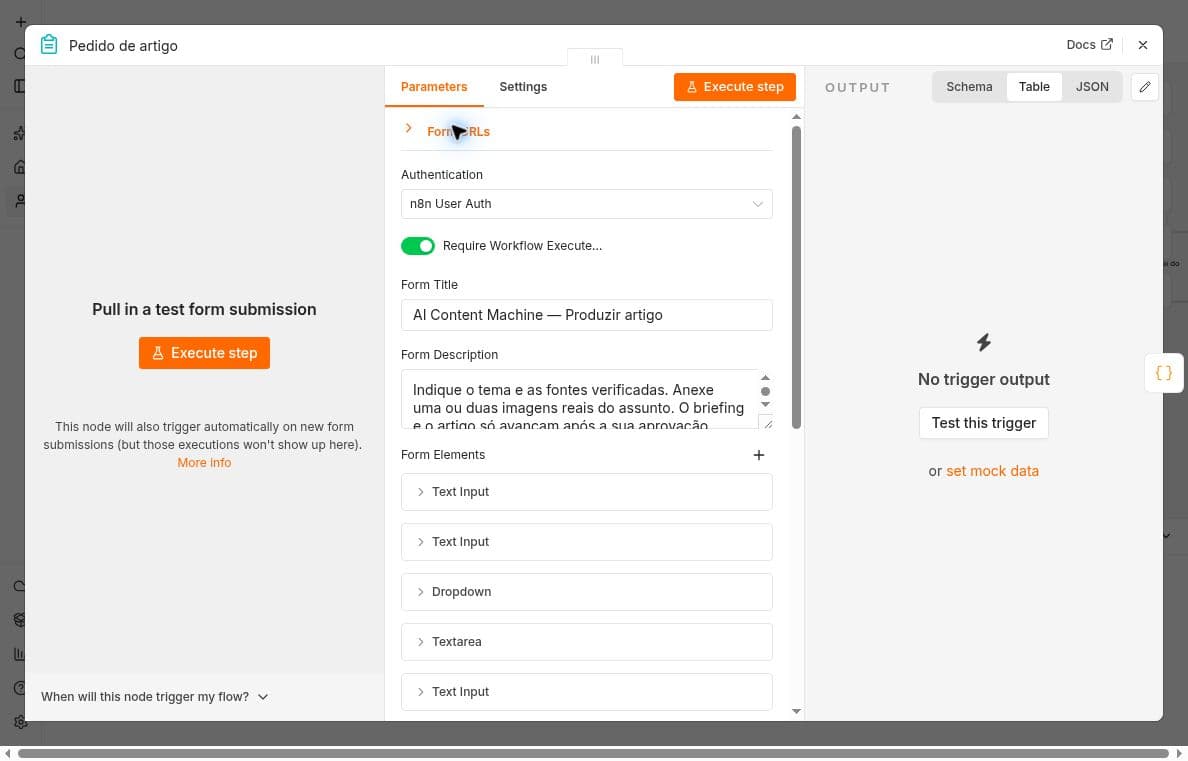
Screenshot: AI Content Machine production request settings, captured September 30. The private form URL is collapsed. This view records configuration; no request was submitted.
The project records the original requester's identity. Its brief and final review code compares the submitting user's identifier with that saved requester. A different identifier stops the review. A typed name, an editable hidden field, or a JSON value saying review_status is approved cannot substitute for authenticated identity.
The delivery validator also checks consistency between requester and reviewer fields. Those checks depend on a trusted upstream workflow. Anyone able to edit that workflow or submit arbitrary packages could manufacture matching fields, so restrict editor access and allowed callers as part of the design.
Reject or request corrections before delivery
The final form asks for the title, description, slug and article text, plus an explicit confirmation covering facts, image relevance and permission. In the checked-in implementation, a non-approval decision returns approved false. Missing editorial confirmation throws an error.
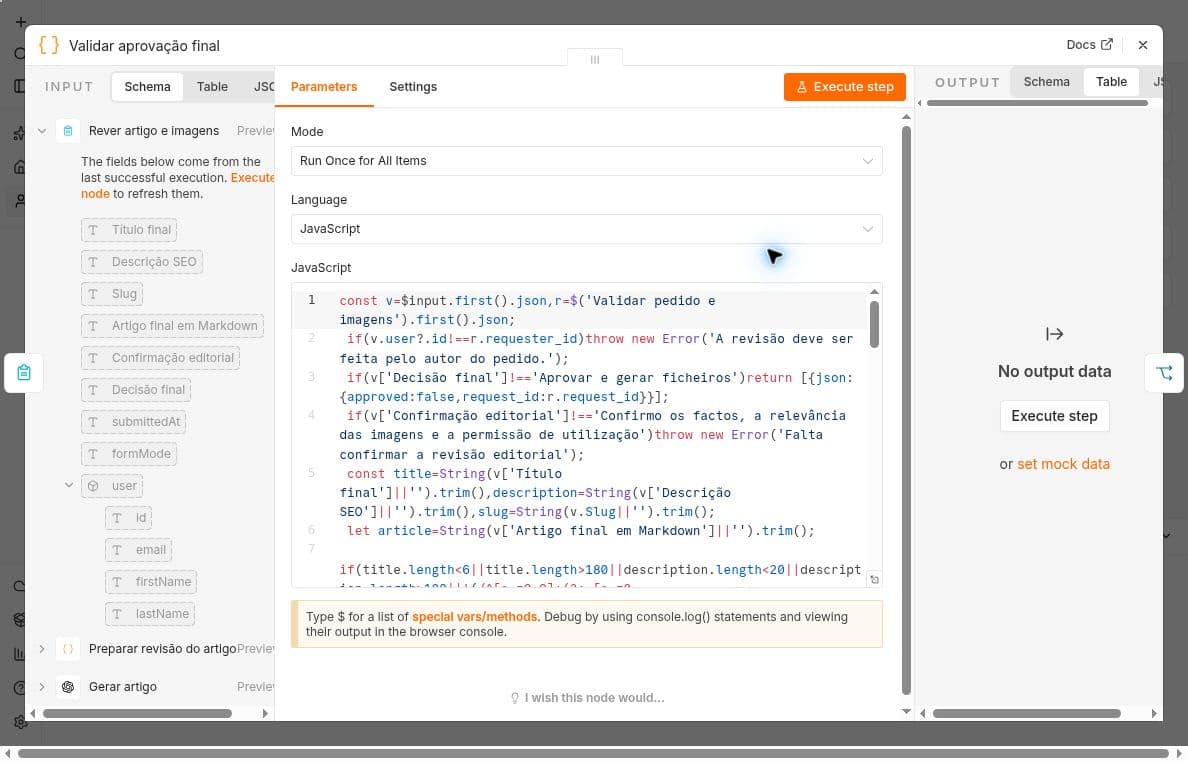
Screenshot: AI Content Machine final approval gate, inspected without executing it. The left panel lists input field names; it displays no personal identity values.
Keep a rejected article as work to revise. Do not translate rejection into a successful publication status or quietly send an older draft. When the content changes, show the revised version to the reviewer and obtain a new decision.
The final gate also checks the supported Markdown structure and obvious secret-like strings. These are useful guardrails with a limited scope. A syntactically valid article can still contain an unsupported claim or a confidential detail that a pattern does not detect.
Verify the approved content hash
After final review, the implementation inserts the selected image references and captions and computes a SHA-256 digest of the resulting article body. The delivery validator removes front matter, trims the body and recomputes that digest before preparing repository files.
If the body has changed, delivery stops with an article-changed error. Images have their own hashes and are checked separately. Preserve the exact normalization used by both stages; changing whitespace rules on only one side can reject otherwise unchanged content.
This digest identifies content. It does not authenticate a reviewer. The current contract also uses separate metadata fields for the title, description and slug. If your process allows those fields to change outside the final form, extend the review contract to bind them explicitly rather than assuming the article-body hash covers every field.
Create a proposal for GitHub review
Once the package passes validation, delivery prepares Markdown, the approved images and a receipt for a draft pull request. The repository workflow reserves a deterministic branch before writing files so a repeated delivery cannot silently overwrite the same proposal.
n8n's Execute Sub-workflow documentation describes the parent-to-child handoff and the option to wait for completion. Treat the returned delivery result as a separate status from editorial approval. An approved article may still encounter a GitHub error.
A draft pull request remains a proposal. Inspect its diff, image paths and rendered preview before any authorized merge. The download package should remain available if repository delivery fails.
Test the boundary with a harmless fixture
Use a fictional article and a controlled screenshot in an isolated test. Keep the model nodes disconnected or supply fixed text so the approval tests do not generate additional content.
- Submit matching synthetic requester and reviewer values and confirm that the final code gate accepts the fixture
- Change the reviewer value and confirm that the gate rejects it
- Choose the rejection decision and confirm that approved remains false
- Prepare a valid package, then alter its body without replacing the saved digest
- Confirm that delivery rejects the edited body before any repository write
- Separately test the actual signed-in form with authorized accounts before claiming authenticated end-to-end coverage
The local checks for this article passed the first five cases against the checked-in code. They used synthetic identities and did not exercise a browser login or prove that a real person approved anything. The live configuration screenshots support the implementation description. A two-account authenticated submission test was not performed, so the local identity-rejection result must not be described as live authentication validation.
Apply the pattern to your workflow
Keep one record for the brief decision, one for the final article decision, and a distinct delivery result. Start from the first AI content workflow tutorial if you still need the basic request-to-brief path.
The free Editorial Human Review Gate is available as a manual demonstration. It checks the supplied decision and reviewer fields; production use still needs a trusted authenticated review path. Test rejection and post-review edits in your own isolated workflow before allowing repository delivery.