A useful first content workflow has a modest goal: turn a well-defined topic into a brief that an editor can review. Starting with a full publishing system makes it harder to see whether a problem came from the input, the model, the file export or the delivery step.
This tutorial demonstrates a small sequence: validate the topic, generate one brief, check its structure and stop for review. It builds on the existing Topic Intake Validator tutorial. You can keep that validator unchanged while adding the next stage.
If n8n is new to you, first follow the beginner guide to n8n workflows and complete its credential-free validator example. This page starts at the hand-off from a validated idea to a reviewable brief; it does not replace the input boundary.
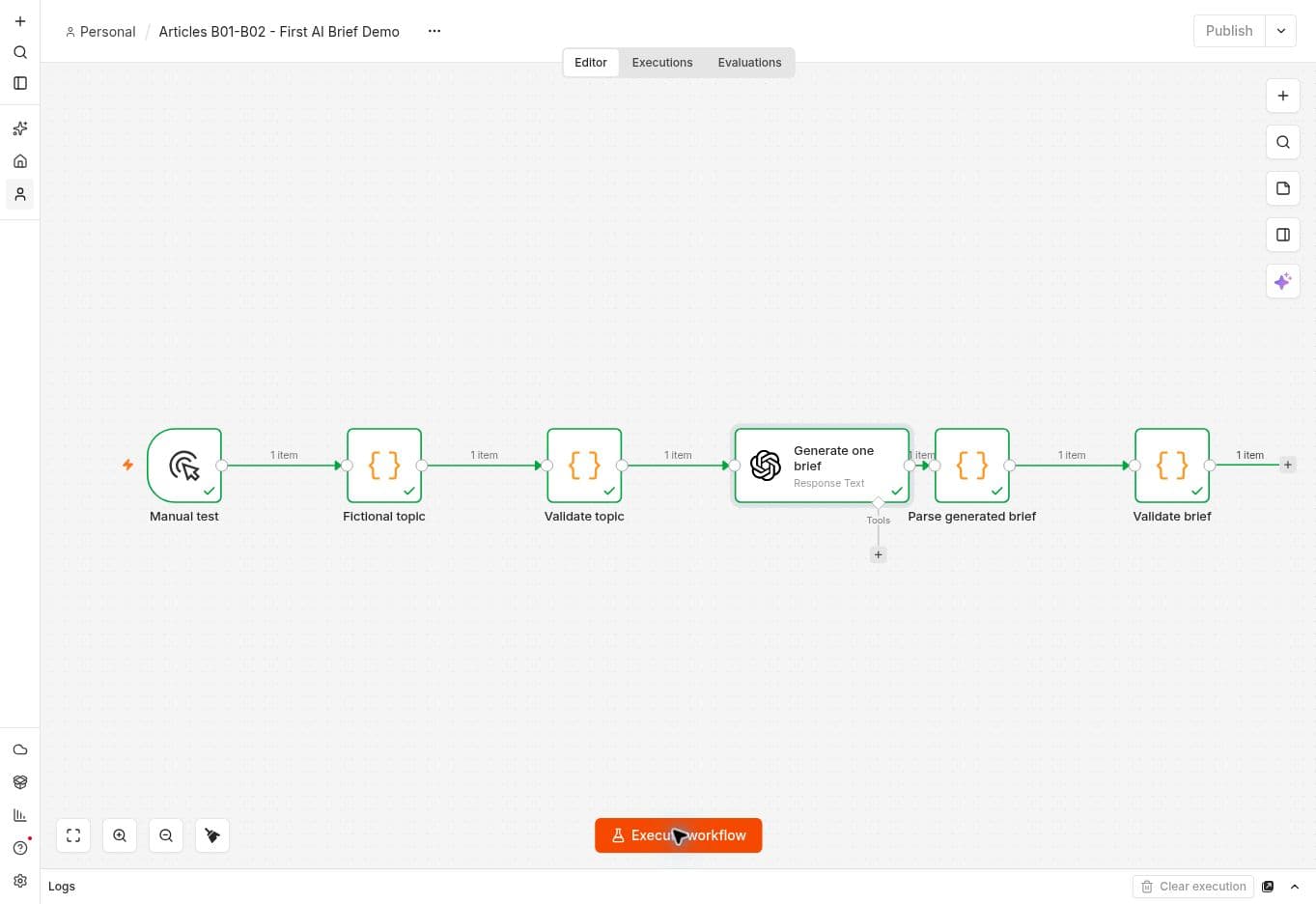
Real n8n execution from the project test workspace, 29 September 2026. The six nodes completed with fictional input.
Define the result before building
Use a fictional topic such as preparing an editorial checklist for a small team. Decide who the checklist serves, what question it answers and which facts the brief may use. Do not include confidential customer material in your first run.
The output should have five named fields: brief_title, target_audience, primary_keyword, objective and outline. These match the required fields in this project's free Brief Readiness Validator. The current validator expects outline as text with one section per line; if the model returns an array, explicitly convert it rather than relying on an implicit conversion.
Keep the workflow manual during development. A successful manual run provides evidence about that input and configuration; it does not establish that an unattended schedule will behave correctly.
Prepare a controlled demonstration
Start with the no-model path. Run the Topic Intake Validator with fictional input, remove one required field, then restore it and confirm the successful output. This gives the demonstration a visible success, rejection and recovery record before any provider request is considered.
If the owner has separately approved a model call, use one fictional topic and one manual execution. Record the n8n version, node operation, model, output limit and any usage returned by the provider; record usage as unknown when it is not exposed. An output limit is not a complete spending cap. Keep publishing disconnected, do not include secrets in screenshots or exports, and leave the workflow manual and inactive after the test. The OpenAI and n8n credential guide covers the authentication and export checks for that optional next step.
Keep invalid topics away from the model
Connect the existing intake validator before the generation step. Remove the audience from a test input and confirm that execution stops there. Restore it before proceeding.
Do not catch that validation error and continue into the model with an empty object. The purpose of this boundary is to prevent incomplete requests from becoming paid attempts to guess what the editor intended.
Add one brief-generation step
Select the existing OpenAI credential in the appropriate n8n node, following the OpenAI and n8n credential guide. The credential documentation describes the API-key authentication route. Keep the key out of prompts, sample inputs and exported tutorials.
Give the model the validated topic, audience, objective and reviewed source notes. Ask for the five output fields, an outline with at least three sections, and an explicit list of uncertainties. State that it must not invent source URLs or transform missing evidence into facts.
Parse the response according to the actual node output. Treat a missing field or unparseable response as a failed brief. Do not silently replace malformed output with default text and mark it ready.
Validate structure, then request judgment
The existing Brief Readiness Validator checks that the five fields are present and that the outline contains at least three non-empty sections. That is a structural check. It cannot decide whether the argument is useful, the keyword is commercially valuable or a source supports the proposed claim.
The editor should compare the proposed outline with the intended reader and the available evidence. A brief that passes structural checks can still be rejected for being generic, repetitive or unsupported.
If the validator is extracted as a subworkflow, explicitly map its input and wait for its result. n8n's Execute Sub-workflow documentation describes the call and return boundary. Keep that boundary small enough to inspect.
Run a positive and a negative case
For the positive case, record the input, the node versions and the resulting brief. Confirm the five fields and read the outline. For the negative case, remove a required intake field and check that the model is never called. Also test a response containing only two outline sections: it should fail the readiness check.
Record these as separate results. A successful sample does not prove the failure path, and a rejected invalid sample does not prove that a valid brief is useful.
Stop before publishing
End the first version with a reviewable brief. Article generation, image handling and delivery can be added after this boundary works. This example was imported into a new n8n workflow and executed with gpt-4o-mini using the existing authorised credential. One model call produced “Editorial Checklist for a Small Team”, with five outline sections and an explicit uncertainty. The final output was brief_ready with review_status still pending_human_review.
Reuse the existing topic and brief validators first. The next improvement is a source manifest that makes missing evidence visible before drafting begins.
What the test established
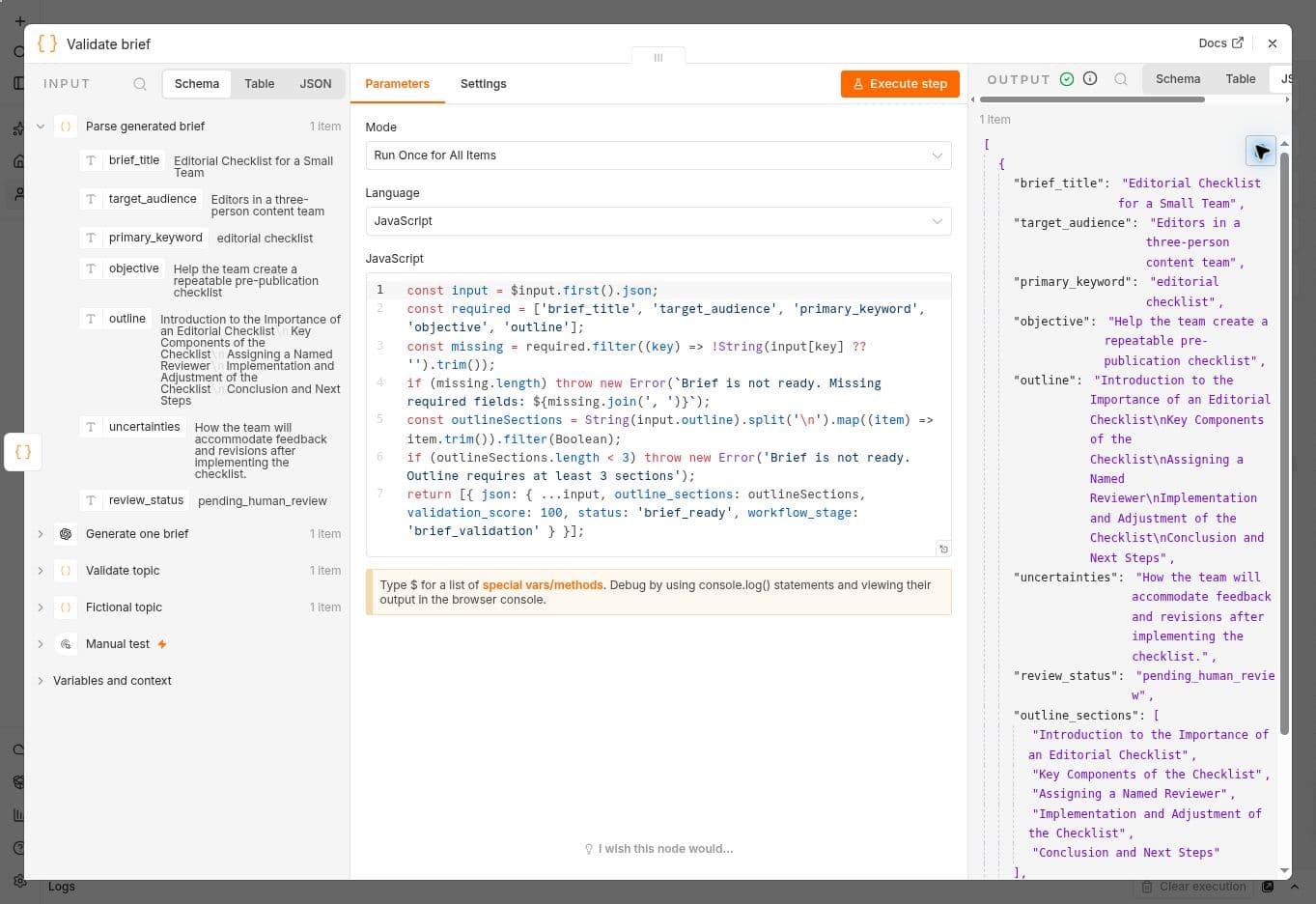
The successful live run returned the expected fields. A second live run with an empty audience stopped at Validate topic with “Missing required fields: audience”; the model node did not execute. The valid sample was then restored and saved. A separate local test confirmed that a two-section outline fails the same readiness code. The output limit was 700 tokens; that configured limit is not a measurement of billed usage.
The generated outline is structurally usable, but its introduction and conclusion are generic. Before commissioning the article, an editor should sharpen those sections and resolve the recorded question about handling feedback. A validation_score of 100 is a structural result, not an editorial quality rating.
The sanitised demonstration JSON is an internal development/review copy, not a public download. It contains no credential references or pinned execution data. After importing it, inspect which credential is selected before running it.
When this brief is eventually promoted toward publication, use the article indexing checklist to verify the page's public technical signals. A successful workflow run is evidence about the run, not evidence that a search engine has indexed the article.