AI can turn a clear content brief into a useful outline, research plan or article draft. It cannot reliably repair an input that never defined the topic, audience, intent or editorial purpose. If incomplete ideas go directly to a model, the workflow spends tokens producing generic work and a reviewer has to discover the missing context at the end.
The safer pattern is to validate the idea before any AI call. This tutorial uses a free three-node n8n workflow to check four required fields, trim their values and return a predictable payload for the next stage. You will run one fictional idea, reject an incomplete input and restore the successful result. The download uses no credentials or external calls and starts manually. Your existing n8n instance remains subject to its plan and execution limits.
If nodes and triggers are new to you, start with the practical n8n beginner guide. Then use this page for the validator’s exact contract and boundary tests.
Treat the validator as the first demonstration boundary, not as a demand or accuracy test. The safest rehearsal needs no provider credential: record one valid result, one named validation failure and the restored result before you connect the output to research or an AI model.
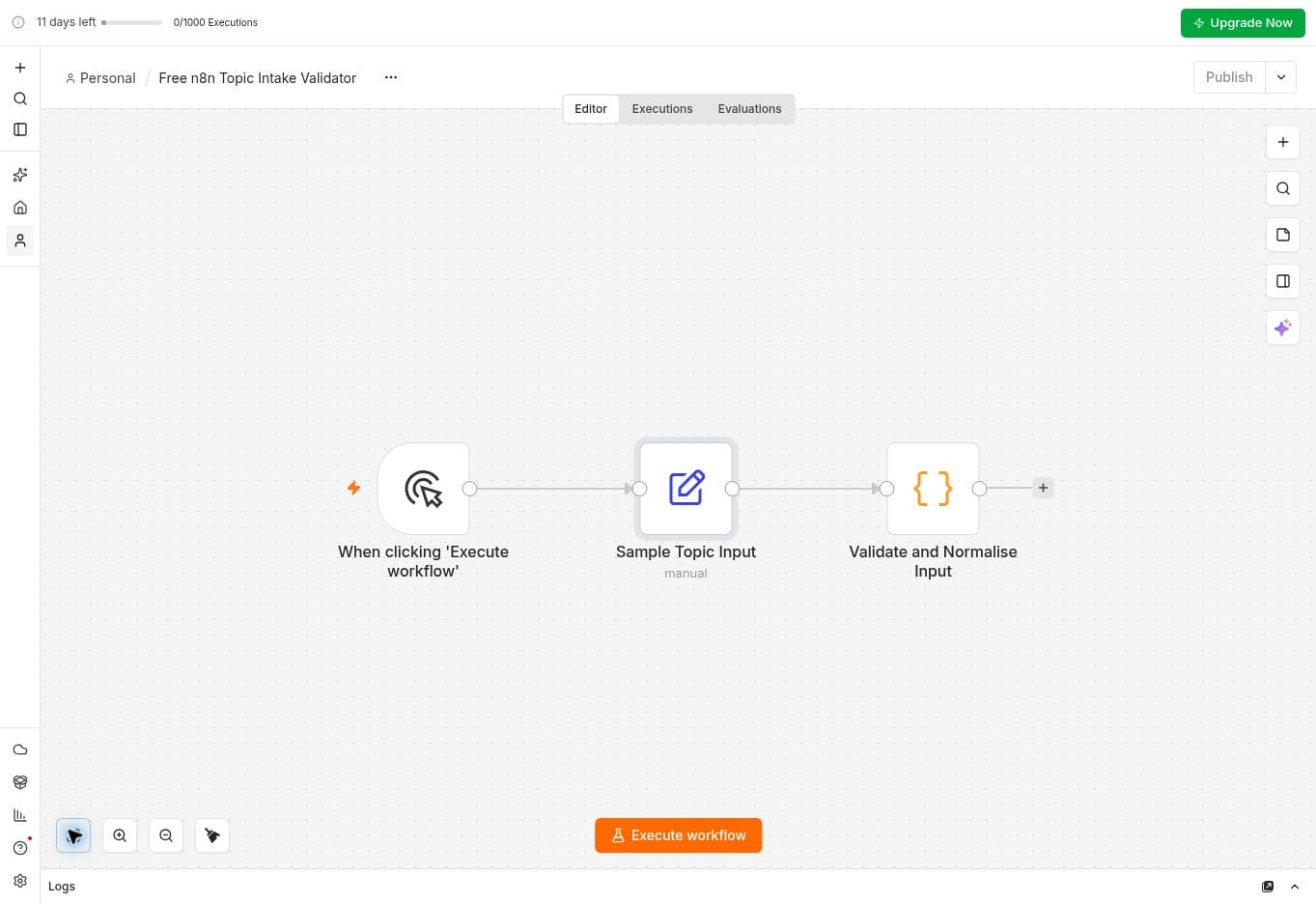
What the workflow validates
Every content idea must include:
- topic: the specific subject the content will address;
- audience: the person or team the content is meant to help;
- search_intent: what the reader is trying to learn, compare, build or solve;
- content_pillar: the strategic category that the idea belongs to.
The four required fields must be non-empty strings. Missing, null or whitespace-only values stop with Missing required fields and name the affected fields. A number, boolean, array or object stops with Invalid field types (expected string). Type errors are checked first, so correcting one may reveal a separate missing-field error on the next run.
A successful run trims the required strings and lowercases search_intent. The optional primary_cta is converted to trimmed text; when absent or null it becomes an empty string. A successful result also contains two control fields:
- status: validated;
- workflow_stage: topic_intake.
Those control fields describe the result of this validation step. Keep the next node connected to this step’s successful output rather than trusting a status value supplied by an unrelated caller. The code overwrites any incoming status or workflow_stage values with its own result.
Know the limits before extending it
This download is a single-idea example. Its Code node reads the first incoming item with $input.first() and returns one item. Additional incoming items are not validated or returned. Before connecting a spreadsheet, queue or another multi-item source, add and test deliberate per-item processing.
The checks establish input shape. They do not measure search demand, verify facts, approve publication or enforce an allowed list of search intents. Any non-empty string passes search_intent, then becomes lowercase. The validator has no maximum-length rule. Choose length limits for your own downstream system before sending text to a model.
Extra JSON fields pass through unchanged. This is not a sanitiser or a secret detector. Supply only the fields your workflow needs, use fictional test values and review the payload before connecting external services.
Why validation belongs before the AI node
Without an explicit gate, every downstream node has to guess whether its input is complete. A model might hide the problem by generating plausible text, but plausible output is not the same as a useful answer for the intended reader.
Early validation creates four advantages:
- Lower cost: incomplete inputs stop before a paid API request.
- Clear failures: the execution names the missing field instead of returning a weak draft.
- Reusable data: every downstream node receives the same predictable structure.
- Better review: a human can evaluate the content against an audience and intent that were recorded at the beginning.
The official n8n data guide explains that information moves between nodes as items containing JSON. That makes a small validation node a natural boundary between raw input and the rest of the workflow.
The three nodes
1. Manual trigger
The Manual Trigger starts the workflow only when you select Execute Workflow. n8n recommends it for workflows that you want to run manually, which is appropriate for learning and controlled tests.
A manual trigger also prevents an unfinished workflow from receiving production traffic. Keep it while you validate the logic. Add a webhook, schedule or application trigger only after repeated tests pass.
2. Sample Topic Input
The second node is an Edit Fields (Set) node that provides an example payload. Keep the four required fields typed as String. The supplied download uses:
- topic: How to automate content research with n8n;
- audience: Small teams building AI-powered content operations;
- search_intent: learn;
- content_pillar: n8n Workflows.
Replace these values with a real idea after you understand the flow. Do not use confidential customer data, credentials or private personal information in a shared example.
3. Validate and Normalise Input
The final node reads the incoming JSON, checks the required fields and trims their values. If a field is invalid, it throws an error that stops the execution. If every check passes, it returns the normalised payload with status set to validated.
This is deliberately deterministic. The workflow does not ask another model whether the input looks complete. Required-field validation is a rule that code can enforce consistently.
Import and run the workflow
- Open the free Topic Intake Validator page.
- Select Download workflow JSON.
- In n8n, create or open the project where you want the workflow.
- Open the workflow menu and choose Import from File, then select n8n-topic-intake-validator.json.
- Confirm that the workflow contains exactly three connected nodes.
- Keep the workflow inactive.
- Select Execute Workflow.
- Open the final node and inspect its output.
The download is linked directly from the workflow page; no email signup is required for that JSON. The starter kit is a separate resource.
The official n8n export and import documentation confirms that workflows can be moved as JSON. Exported production workflows may contain credential names and IDs, so inspect any file before sharing it. This free workflow contains no credential references, workflow IDs, webhooks or external integrations.
Positive test: complete input
Run the workflow with all four sample fields populated. The execution should complete all three nodes and return one item.
Confirm that the final item contains:
- status equal to validated;
- workflow_stage equal to topic_intake;
- topic equal to How to automate content research with n8n;
- audience equal to Small teams building AI-powered content operations;
- search_intent equal to learn;
- content_pillar equal to n8n Workflows;
- optional primary_cta equal to Explore the workflow library in the supplied sample.
For a reproducible fictional example, change topic to How to prepare a weekly editorial checklist and audience to Small agency content teams. Keep content_pillar as n8n Workflows and primary_cta as Explore the workflow library. Set search_intent to Learn with a space before and after it.
Run the workflow. Expect one JSON item containing:
- topic: How to prepare a weekly editorial checklist;
- audience: Small agency content teams;
- search_intent: learn;
- content_pillar: n8n Workflows;
- primary_cta: Explore the workflow library;
- status: validated;
- workflow_stage: topic_intake.
Add spaces around topic and run again. The returned topic should be trimmed. These checks demonstrate normalisation without calling an AI provider.
Negative test: remove a required field
A successful test does not prove that the guardrail works. You must deliberately send invalid input.
Open Sample Topic Input and temporarily empty content_pillar. Execute the workflow again. The validation node should fail with Missing required fields and identify content_pillar. No research or AI node should run after that failure.
Restore content_pillar to n8n Workflows and execute once more. The final run should return status equal to validated. Leave the workflow in this restored, inactive state.
Repeat the same missing-field check for topic, audience and search_intent. In Sample Topic Input, change audience from String to Number and set it to 42. Inspect the upstream JSON to confirm it is a number. Expect Invalid field types (expected string): audience. The text "42" still passes the string check, so inspect the upstream JSON type rather than only the characters in the editor. Change audience back to String, restore Small agency content teams and confirm success again.
Also check a null value, whitespace-only text and two missing fields together. A very long topic currently passes when it is a non-empty string; treat that as an observed boundary of this template, not a length safeguard. Record the result of each test in your own n8n version.
Connect the validated output to AI research
Once the gate is reliable, connect the final output to one next stage. A practical sequence is:
- Topic intake validation.
- Research using approved primary sources.
- Structured editorial brief.
- Human review of the brief.
- Draft generation.
- Deterministic quality checks.
- Human review of the article.
- Publish-ready Markdown.
- Manual publication.
Use the successful output of this validator as the input to your next step. Start with verified sources for a content brief, then follow Build Your First AI Content Workflow in n8n. The later AI stage needs separately configured provider credentials and may incur usage charges. Do not add automatic publishing at the same time. Each new boundary should have its own positive, negative and recovery tests.
The human-review stages remain essential. Validation proves that required fields exist; it does not prove that a claim is accurate, a source is trustworthy or the final article reflects the author's judgment.
Account for execution history
This example has no separate storage or publishing node. However, n8n may save manual execution inputs and outputs according to the workflow and instance settings. An inactive workflow and the absence of a database node do not guarantee that data is never retained.
Use fictional data and inspect the workflow execution settings before running sensitive content. Retention and access decisions belong to the owner of the n8n instance.
Keep the workflow safe to share
Before publishing an n8n workflow as a template:
- remove credential references and environment-specific identifiers;
- remove real execution data;
- use fictional or non-sensitive sample content;
- keep production triggers and publishing nodes inactive;
- document required fields and expected output;
- state which failures were tested;
- include a licence and version;
- inspect the exported JSON before committing it.
The downloadable JSON has three connected nodes, an inactive manual trigger, empty pinned data and no credential references. Review it again after making changes. The licence is documented with the product files; the JSON itself is the importable workflow. Keep a record of the version and the success, rejection and recovery results you actually tested.
That record is useful when you later follow the first AI content workflow: it shows whether a failure happened before the provider boundary or after it. If you add an OpenAI node, use the separate credential and request checks, and do not describe the validator run as evidence that the provider request worked.
Download the free validator
Download the n8n Topic Intake Validator and run the positive and negative tests before connecting it to an AI provider.
The article and workflow were human reviewed by Adjair Gouveia. © 2026 Adjair Gouveia.
Official n8n references
- Manual Trigger node
- Understand n8n data structures
- Create and run workflows
- Export and import workflows
- Using the Code node
Interface labels can change. Use the documentation for your current n8n version as the final reference.